ip
🦉 Vatican // The 6ix Side Assistant User Guide
Welcome to Vatican, a desktop task management application optimized for users who prefer the speed of a Command Line Interface (CLI) but appreciate the sleekness of a modern JavaFX GUI.
Vatican isn’t your standard boring corporate bot. It features a unique Toronto wasteyute persona to keep your productivity in check. It roasts you for moving loose (errors) and blesses you when you get things done.
🚀 Quick Start
- Ensure you have Java
17or above installed on your machine. - Download the latest
vatican.jarfrom the Releases page. - Open a command terminal,
cdinto the folder you put the jar file in, and run:java -jar vatican.jar - Type
helpin the command box and press Enter to see what Vatican can do for you.
🎨 Type-Safe Contextual Styling
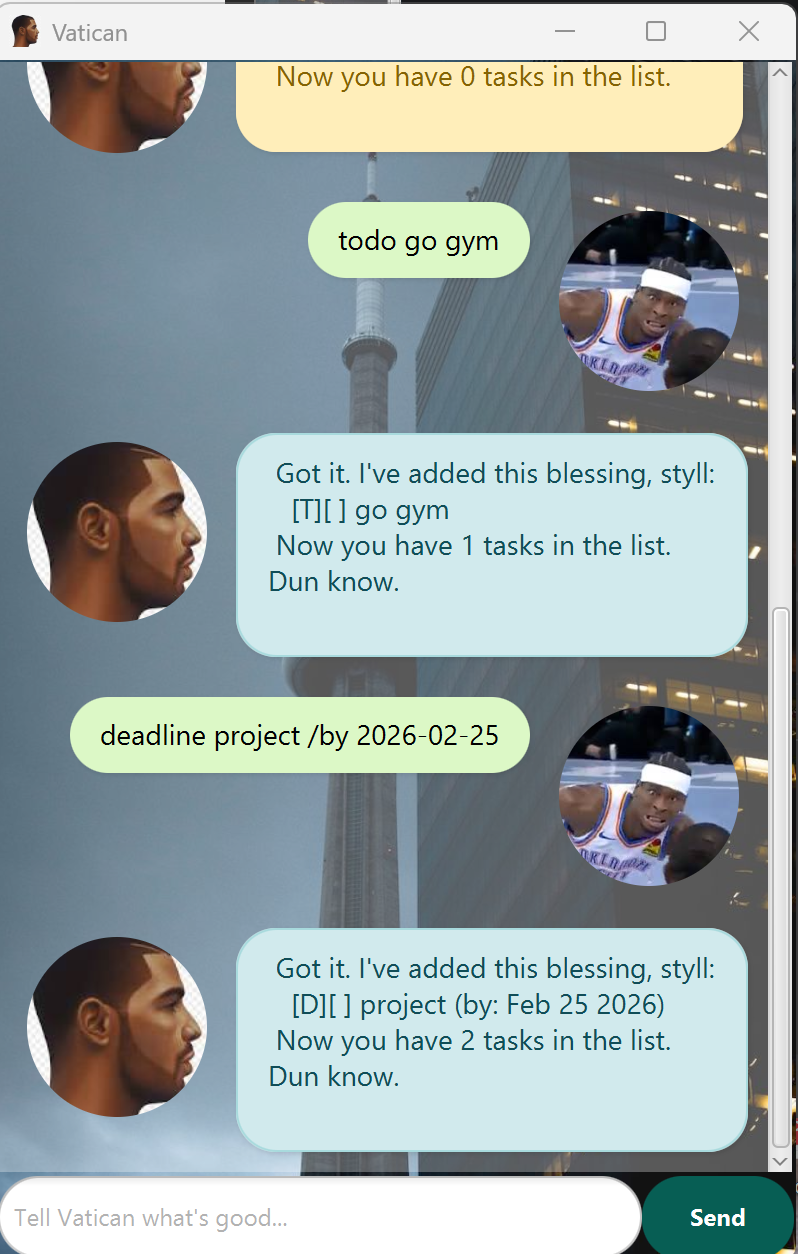
Vatican visually responds to your actions. The interface color dynamically shifts based on the command type so you always know what state your database is in:
- 🔵 Blue: Adding new missions (
todo,deadline,event). - 🟢 Green: Successfully
mark-ing a mission complete. - 🟠 Orange: Clearing
deletewasteyutes or closing the app (bye). - 🔴 Red: When you’re moving loose (invalid syntax, out-of-bounds indexes, or chronology errors).
📸 Product Screenshot
🛠 Command Glossary
todo : Add a simple mission
Adds a standard task without any date or time constraints. Use this for general goals.
- Format:
todo <DESCRIPTION> - Example:
todo hit the gym - Expected Output: Vatican will confirm the task is added and display your new total task count.
deadline : Add a mission with a cutoff
Adds a task that must be completed by a specific date.
- Format:
deadline <DESCRIPTION> /by <YYYY-MM-DD> - Example:
deadline cs2103 project /by 2026-02-25 - Note: Dates must follow the
YYYY-MM-DDformat. Vatican will automatically parse this into a readable format (e.g., “Feb 25 2026”).
event : Add a timed link-up
Adds a task with a specific start and end time.
- Format:
event <DESCRIPTION> /from <START> /to <END> - Example:
event project meeting /from 2026-10-09 /to 2026-10-10 - Strict Validation: Vatican enforces chronological reality. If your
/fromdate occurs after your/todate, Vatican will block the entry and roast you for trying to time travel.
list : See all your current blessings
Displays every task currently active or completed in your database.
- Format:
list
mark / unmark : Update mission status
Check off a task as complete, or re-open it if you jumped the gun.
- Format:
mark <INDEX>orunmark <INDEX> - Example:
mark 1 - Note: The
<INDEX>must be a valid, positive integer that corresponds to a task in yourlist.
delete : Clear a wasteyute
Removes a task from your list permanently.
- Format:
delete <INDEX> - Example:
delete 2 - Expected Output: Vatican will show you the exact task it deleted and update your total task count.
find : Search for specific business
Filters your list to show only tasks containing a specific keyword.
- Format:
find <KEYWORD> - Example:
find gym
help : Open the guide
Displays a quick-reference help menu directly inside the app.
- Format:
help
bye : Peace out
Saves your data and safely closes the application.
- Format:
bye
❓ FAQ & Data Management
Q: How do I save my data? A: Vatican saves your blessings automatically every time you mutate the list (add, delete, mark, unmark). You don’t need to type a save command.
Q: Where is my data stored? A: It is kept locally in a text file located at ./data/vatican.txt.
[!WARNING] Data Corruption Guard: While you can open
vatican.txtmanually, it is highly recommended to let the app manage it. If you manually edit the file and corrupt the formatting, Vatican will safely ignore the corrupted lines on startup to prevent crashing.